Shinyscholar

A template for creating reproducible Shiny applications in R

Simon Smart and Tim Lucas, School of Medical Sciences, University of Leicester

9th September 2025

Shinyscholar helps create reproducible analytical apps in R

  • Creates an empty application with a regular structure
  • Analyses can be reproduced outside the app

Hex logo of shinyscholar showing a black and white mortar cap

Shinyscholar helps create reproducible analytical apps in R

  • Creates an empty application with a regular structure
  • Analyses can be reproduced outside the app
  • Make it easier to follow software development best practices
  • Developers can concentrate on creating functionality

Hex logo of shinyscholar showing a black and white mortar cap

R has cutting-edge statistical methods but barriers can restrict uptake

  • Know how to use R

R has cutting-edge statistical methods but barriers can restrict uptake

  • Know how to use R
  • Able to comprehend documentation

R has cutting-edge statistical methods but barriers can restrict uptake

  • Know how to use R
  • Able to comprehend documentation
  • Access to specific data

R has cutting-edge statistical methods but barriers can restrict uptake

  • Know how to use R
  • Able to comprehend documentation
  • Access to specific data
  • Format data in specific ways

Shiny apps enable anybody to access the power of R


ui <- fluidPage(
  numericInput("number", "Enter a number", value = 5),
  textOutput("answer")
)

server <- function(input, output) {
  output$answer <- renderText(input$number * 10)
}

shinyApp(ui, server)


A screenshot of a basic shiny app displaying an input box to enter a number in and an output displaying the inputted number multiplied by ten.

Current apps do not follow best practices
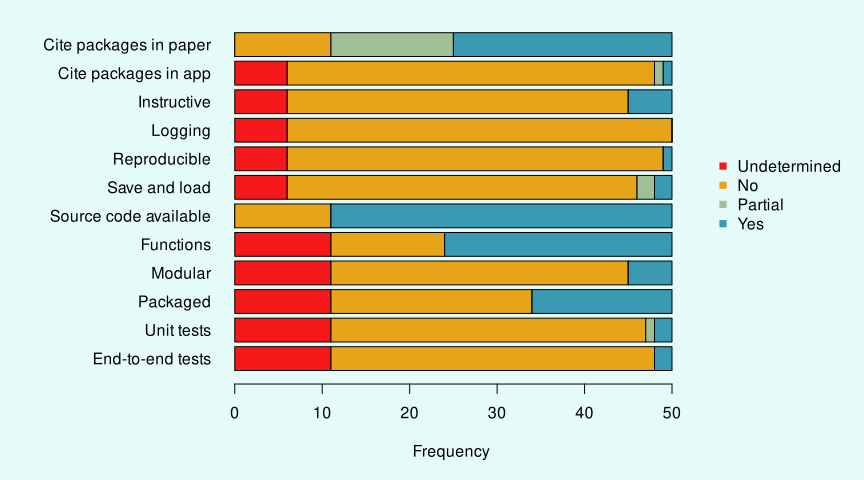
A bargraph showing the results of surveying 50 published apps for features: citing packages in the paper, citing packages in the app, instructions included in the app, logging, reproducibility, saving and loading. Then whether the source code was available, whether it contained functions, was modular, formatted as a package and contained unit and end-to-end tests. Apart from citing packages in the paper and source code being available, the majority of apps lacked features.

Wallace bucked the trend

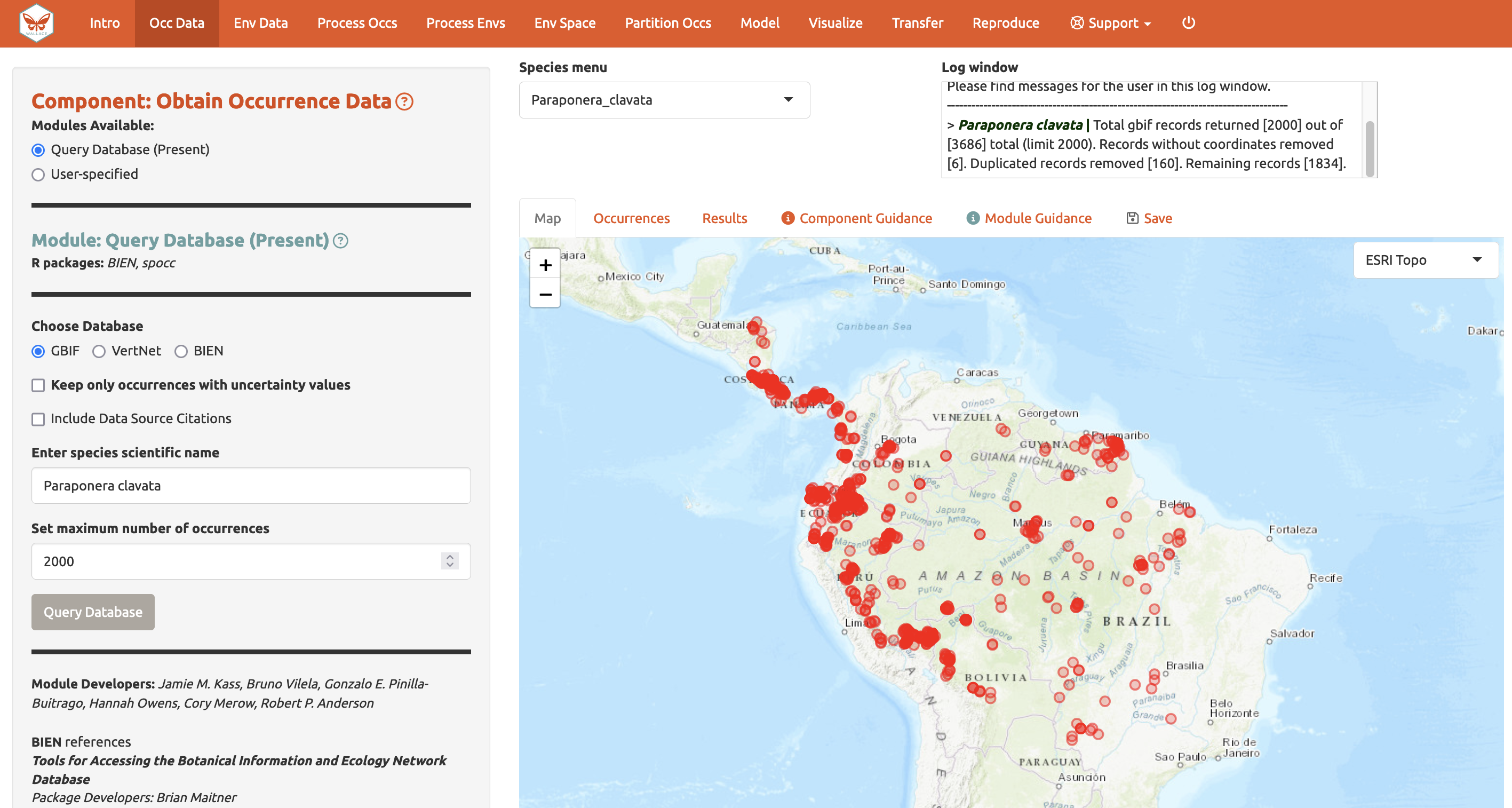
A screenshot of the Wallace app used to model species distributions. A sidebar shows that an option to load occurrence data from a database is selected and the species Paraponera clavata is selected with the point data where the species has been observed plotted on the map.

Kass et al. (2022) DOI: 10.1111/ecog.06547 install.packages("wallace") (not online)

modules contains information about each module

modules <- data.frame(
"component" = "transform",
"long_component" = "Transform numbers",
"module" = "multiply",
"long_module" = "Multiply a number",
"map" = FALSE,
"result" = TRUE,
"rmd" = TRUE,
"save" = TRUE,
"download" = FALSE,
"async" = FALSE)

create_template() creates the skeleton app
shinyscholar::create_template(
  path = file.path("~", "Documents"), 
  name = "demo", 
  author = "Simon Smart",
  include_map = FALSE, 
  include_table = FALSE, 
  include_code = FALSE, 
  common_objects = "result", 
  modules = modules, 
  install = TRUE)

demo::run_demo()

create_template() creates the skeleton app

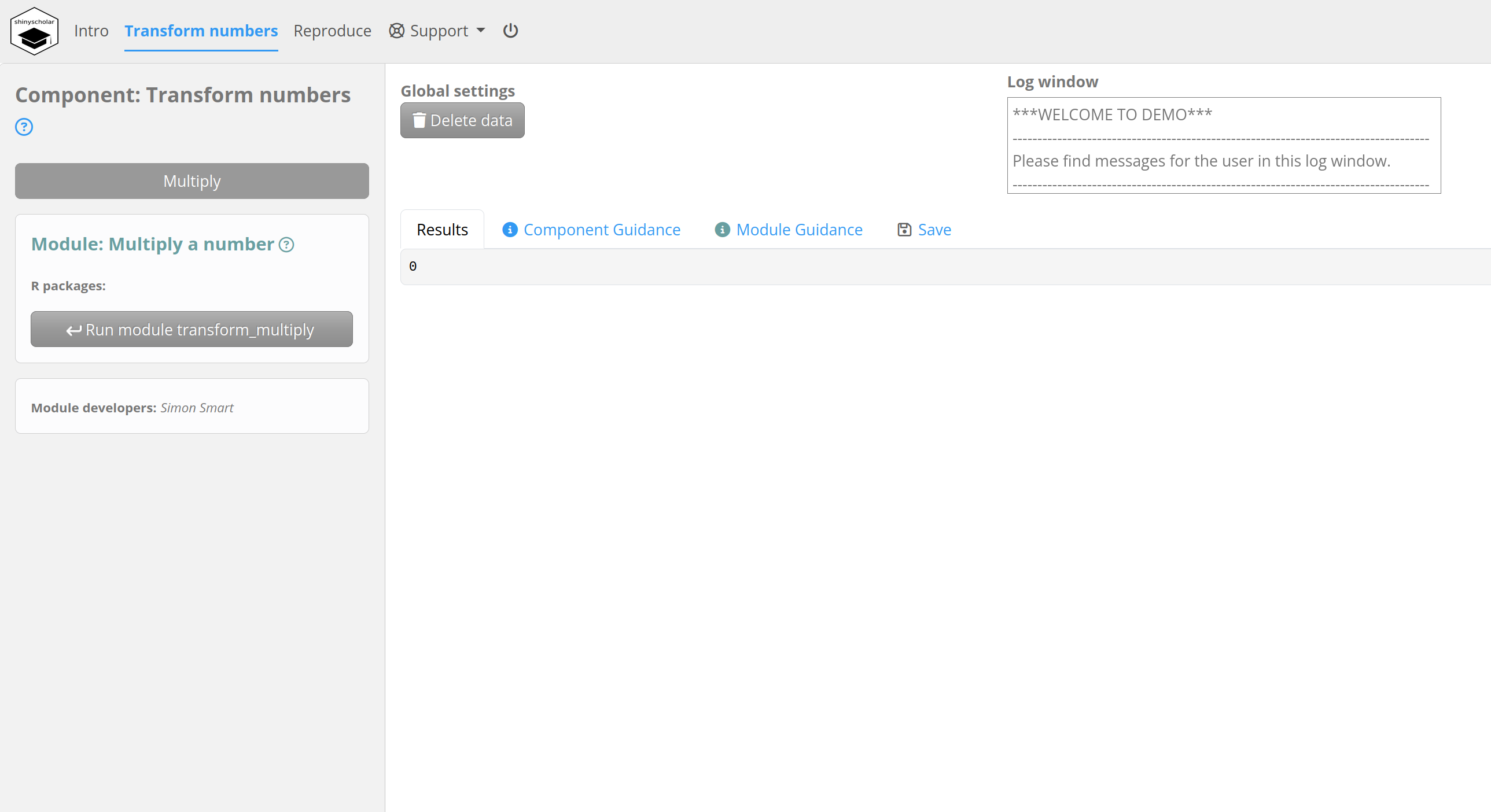
A screenshot of the app running after running the create_template function. A navigation bar at the top enables navigation between components and a menu in the sidebar enables navigation between modules. A logger window is present towards the top of the display and an empty results tab shown in the main panel.

Reproducibility relies on each module calling one function

Create the function:

transform_multiply <- function(number) number * 10

Reproducibility relies on each module calling one function

Create the function:

transform_multiply <- function(number) number * 10

Use it in the module and store the input:

common$result <- transform_multiply(input$number)
common$meta$transform_multiply$number <- input$number

Reproducibility relies on each module calling one function

Create the function:

transform_multiply <- function(number) number * 10

Use it in the module and store the input:

common$result <- transform_multiply(input$number)
common$meta$transform_multiply$number <- input$number

In the Rmarkdown:

result <- transform_multiply({{transform_multiply_number}})

Reproducibility relies on each module calling one function

Create the function:

transform_multiply <- function(number) number * 10

Use it in the module and store the input:

common$result <- transform_multiply(input$number)
common$meta$transform_multiply$number <- input$number

In the Rmarkdown:

result <- transform_multiply({{transform_multiply_number}})

metadata() takes care of a lot of the boring code

Disagapp for disaggregation regression
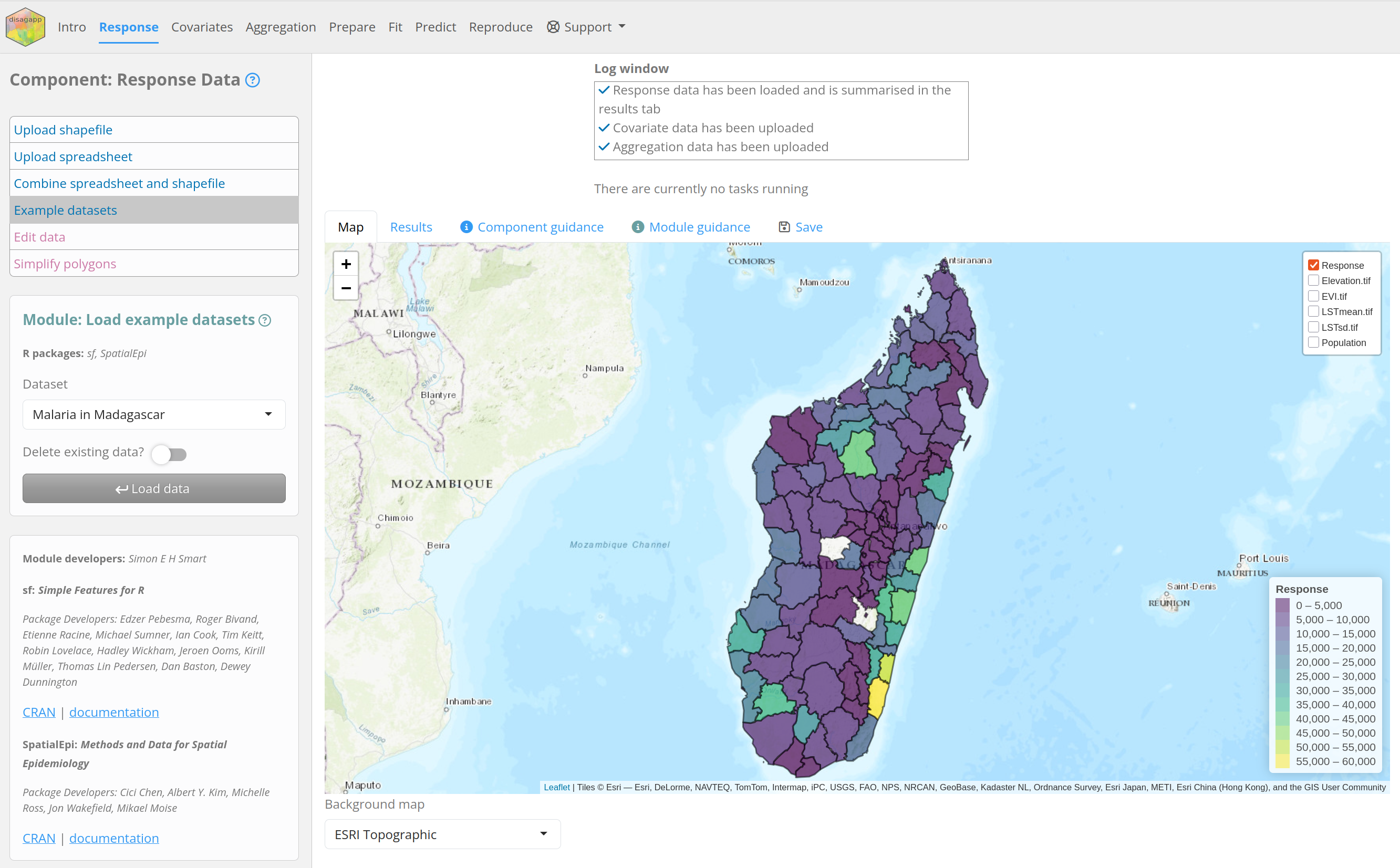
Screenshot of the disagapp app, displaying cases of Malaria in provinces of Madagascar

QR code to https://disagapp.le.ac.uk

MetaInsight for network metaanalysis
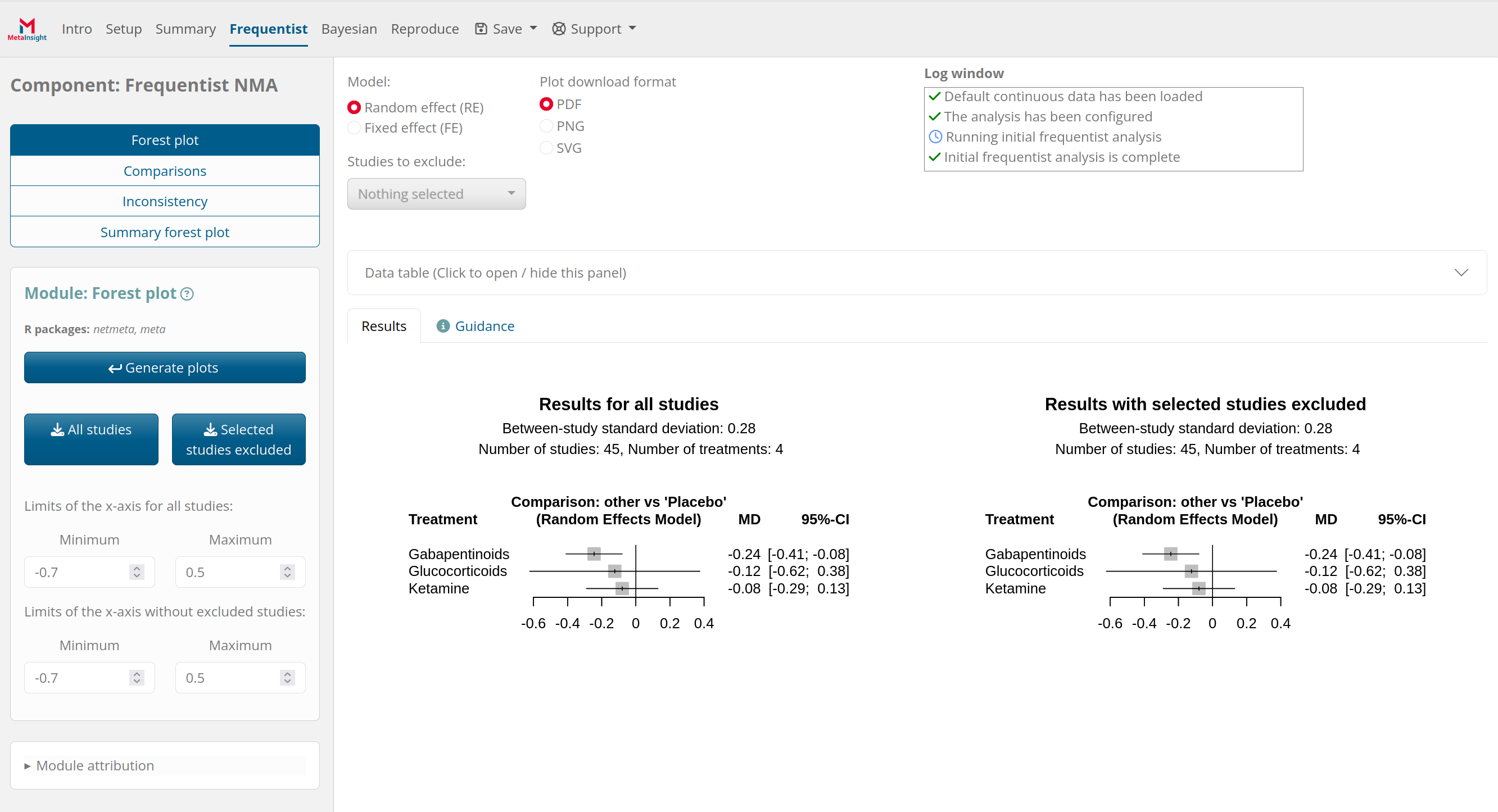
Screenshot of the metainsight app, displaying two forest plots

QR code to https://crsu.shinyapps.io/MetaInsight_Scholar/

Learn more

  • install.packages("shinyscholar")
  • Example app at https://simonsmart.shinyapps.io/shinyscholar/ install.packages("shinyscholar", dependencies = TRUE)
  • README guide to development at https://simon-smart88.github.io/shinyscholar/
  • Workshop for Ukraine

Acknowledgments

  • Wellcome for funding
  • Wallace developers especially Rob Anderson
  • Tim Lucas

Wellcome logo Wallace hex logo